Many mechanical keyboards struggle to find the right balance between aesthetics and functionality, as getting the design just right can be challenging. Recent keyboard releases, like Keychron’s K2 HE Special Edition and the Mchose GX87 Ultra, have been impressively stylish. These models, along with various custom keyboard kits, prioritize aesthetics without compromising performance.
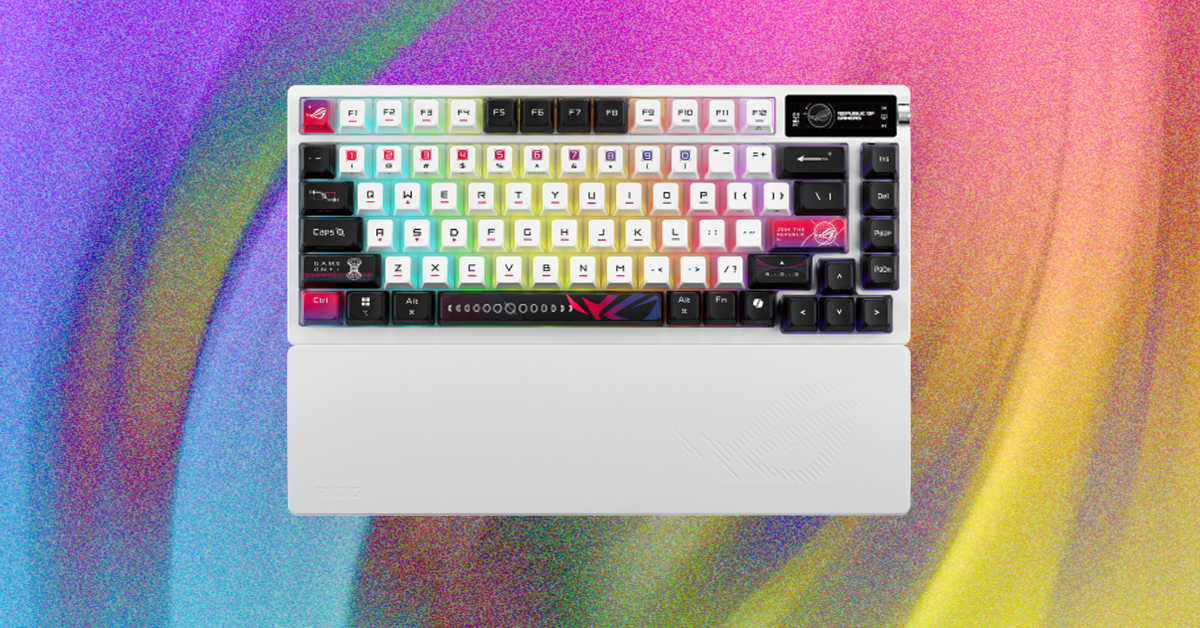
The design elements are impressive, with slightly flatter keycaps featuring a two-piece assembly and clear backs for RGB diffusion. The case boasts a sleek and angular design, exuding a stylish and futuristic vibe without being overly bulky.
In the Azoth X, standard plate-mounted stabilizers come factory lubricated, providing stability without any rattle right out of the box.
When it comes to typing, this keyboard shares similarities with Razer’s BlackWidow V4 75%. Both feature a metal top case, a plastic bottom case, a gasket mount system, and a plastic plate, resulting in similar stiffness and sound profiles. The key difference lies in switch options: Razer’s 75% keyboard sports tactile switches only, while Asus offers linear and clicky switches.
Contrasting with the Razer model, Asus’s ROG Azoth X showcases a sleek white case paired with vibrant and stylish keycaps, offering a non-traditional yet eye-catching design. This keyboard strikes a perfect balance between style and functionality, boasting 2.4 GHz and Bluetooth connectivity, a 1,000-Hz polling rate, and an internal configuration that enhances typing comfort and customization. Available in white, it offers clicky or linear NX switches and includes a silicone wrist rest, albeit with a hefty price tag of $300.
Crafty and innovative, the gasket-mounting system of this keyboard creates a unique blend of stability and smoothness. Rather than using the standard foam gasket, the snugly-fitted rubber gaskets within the case ensure a consistent typing experience, closely integrating the keyboard with the case. While it still offers a hint of bounce and softness characteristic of a gasket mount, it’s more subdued compared to many similar models.
During testing, I used Asus’s Snow linear switches, which offer light and smooth keypresses with a deep typing sound. Despite not being the smoothest switches available, they provide minimal and consistent friction, resulting in a pleasurable typing experience. Additionally, these switches exhibit minimal stem wobble, ensuring firm and secure keypresses. Requiring less force than Cherry MX Red switches —53 grams compared to MX Red’s 60 grams to bottom out— they feel more responsive without the risk of mis-inputs due to ultra-light springs.